- Home
- Launcher comparison
- SolaTV or Projectivy
SolaTV or Projectivy Launcher: which to choose for Android TV
SolaTV and Projectivy Launcher are free, show no ads and run on Android TV and Google TV, but they solve different tasks. SolaTV combines the home screen and an IPTV player with a TV guide and catch-up in a 3.9 MB file. Projectivy bets on styling: video wallpapers, icon packs, customizable rows. On ten criteria SolaTV scores 92 out of 100 and Projectivy Launcher 70: it is stronger in customization and installs on Android 6.0.
SolaTV
A light, free launcher with built-in IPTV: playlist, TV guide, catch-up. No ads, no analytics.
Download →Projectivy Launcher
The most customizable free, ad-free launcher: wallpapers, rows, icons. No IPTV, paid Premium.
Main differences between SolaTV and Projectivy Launcher
The main difference is TV. SolaTV opens an M3U playlist from your provider, shows an XMLTV TV guide and plays past programs from the archive. Projectivy Launcher has no IPTV player of its own: the home screen shows channels and programs published by installed apps, and a playlist needs a separate player.
The second difference is weight and data. The SolaTV install file is 3.9 MB; the Projectivy 4.72 APK is 10.9 MB on the developer’s GitHub and 13.2 MB on APKMirror. Projectivy collects usage statistics and crash reports through Google Firebase, which can be turned off in settings. SolaTV has no analytics at all.
| Criterion | SolaTV | Projectivy Launcher |
|---|---|---|
| LightnessInstall file size | 10APK 3.9 MB, no animations | 8APK 10.9–13.2 MB |
| No adsAds and promoted rows on the home screen | 10No ads | 10No ads |
| PrivacyData collection and analytics | 10No analytics, no advertising IDs | 7Firebase usage and crash data, opt-out |
| PriceWhat is free and what is paid | 10Free, no paid features | 8Free, Premium as a one-time purchase |
| IPTVTV from your own playlist | 10M3U, groups, XMLTV guide, 7-day catch-up | 2No M3U player, only app rows |
| SearchMovies, channels, apps and voice | 10Movies, channels and programs, voice input | 4No own search, Assistant via the remote button |
| CustomizationApp order, rows, wallpapers, colors | 7Order, hiding, 5 colors, tile size | 10Rows, image and video wallpapers, icon packs |
| CollectionsMovies and series on the home screen | 7TMDB collections with posters, not personalized | 4Watch Next and app channel rows |
| DevicesWhich TVs and boxes it installs on | 8Android 8.0 and newer, any brand | 10Android 6.0 and newer |
| Home screenHow it becomes the default and how to restore the stock one | 10Sets itself on Android TV and Google TV, one-button undo | 7Home button service, turned on manually |
| Totalout of 100 points | 92 | 70 |
SolaTV gains the most points on IPTV (8 more) and search (6 more). Projectivy leads on styling and older boxes, by 3 and 2 points.
Where Projectivy Launcher is stronger
- Styling. Categories and rows with adjustable spacing and styles, wallpapers from images, GIFs and videos with brightness and blur control, interface colors matched to the wallpaper, icon packs and app renaming.
- Older devices. Projectivy installs on Android 6.0 and newer, SolaTV requires Android 8.0.
- Parental control. It is part of Premium together with custom wallpapers, icon changes and fonts.
- Google Play. Projectivy installs and updates from the store: over a million installs and a 4.5 rating from 3,098 reviews.
Projectivy Premium is paid once and works on all devices with the same Google account. In Google Play in-app items cost $0.99–$7.49; outside the store the license sells for €6.99.
Where SolaTV is stronger
| Feature | SolaTV | Projectivy Launcher |
|---|---|---|
| TV from a playlist | M3U as a link or file, groups, XMLTV guide, 7-day catch-up, pause | No, only channels from apps |
| Search | Movies and series with posters, your channels and programs, voice input | No own search, Assistant via the remote button |
| Movies on the home screen | New releases, popular titles, series and cartoons, opened in Lampa, NUM or another app | Watch Next row and app channel programs |
| Price | Everything free | Some features in Premium |
| Data | No analytics | Firebase usage and crash data, opt-out |
On Google TV both launchers become the home screen the same way: through an accessibility service that catches the Home button. In March 2026 Android Authority reported that after a Google TV update the Projectivy override stopped working for some users. SolaTV uses the same mechanism, so Google’s changes affect both. The difference is that on Android TV SolaTV disables the stock launcher itself, and the “Restore” button undoes all changes.
SolaTV and Projectivy Launcher home screens
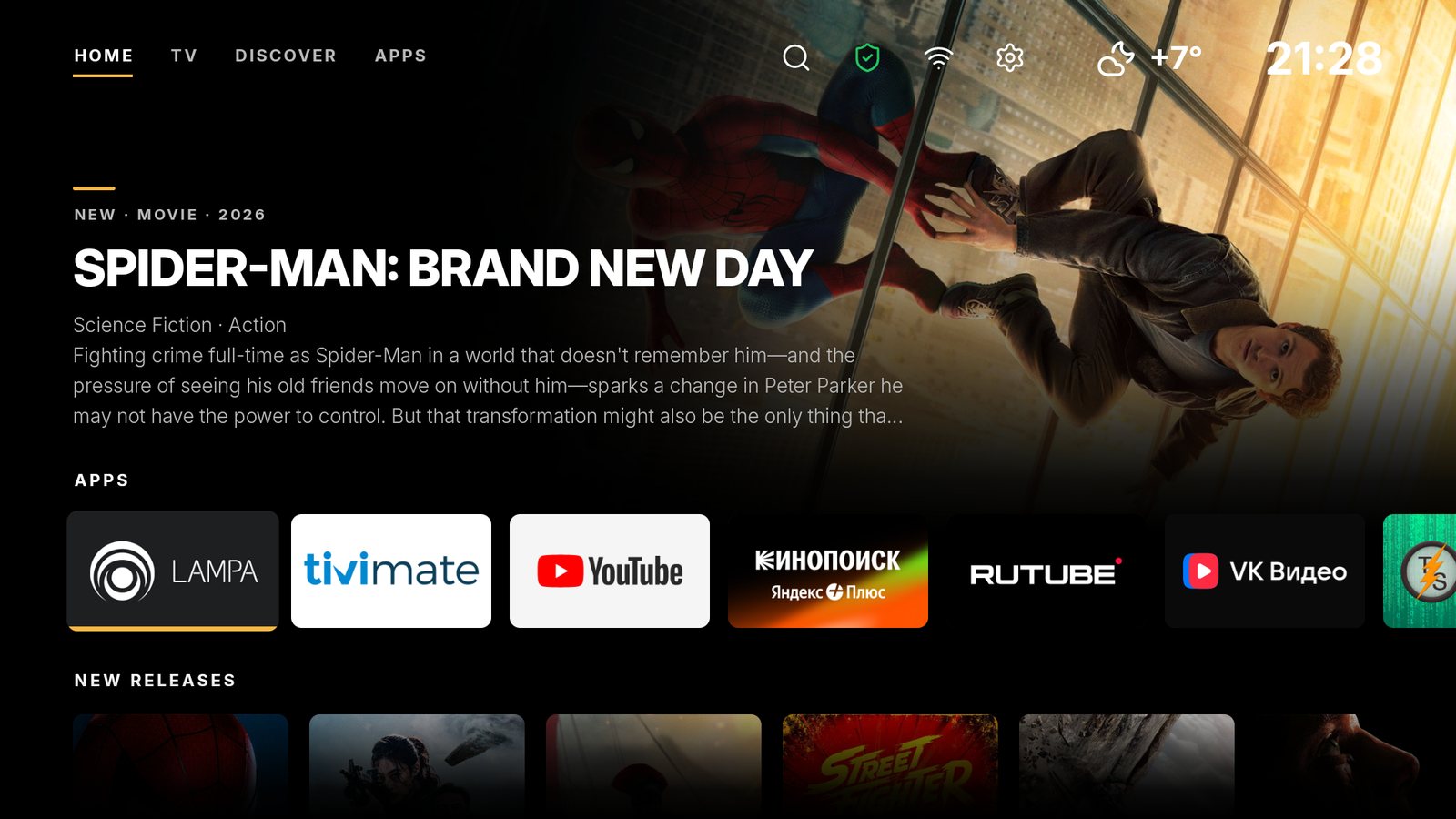

How to switch from Projectivy Launcher to SolaTV
- Install SolaTV following the guide “How to install apps on Android TV”.
- In Projectivy settings turn off the launcher override: General → Change default launcher. The Projectivy service can also be turned off in “Settings → Accessibility”.
- In SolaTV settings open “Default launcher” and press “Make default”.
Projectivy can stay installed: as a regular app it does not interfere with SolaTV. More on the Home button on Google TV is in the guide “How to change the launcher on Android TV and Google TV”.
Frequently asked questions
Does Projectivy Launcher have IPTV?
Projectivy has no player for M3U playlists: neither Google Play nor the developer site lists one. The launcher shows Android TV channels and programs published by other apps.
Which launcher is lighter, SolaTV or Projectivy?
SolaTV: a 3.9 MB install file against 10.9–13.2 MB for Projectivy 4.72. SolaTV has no animations or video wallpapers, and images load only next to the selected item.
How much does Projectivy Premium cost?
In Google Play in-app items cost $0.99–$7.49 each; outside the store the license costs €6.99. It is a one-time purchase with no subscription.
Can SolaTV and Projectivy be installed at the same time?
Yes. One launcher works as the home screen, the other stays a regular app. Before “Make default” in SolaTV it is better to turn off the override in Projectivy so the two services do not compete for the Home button.