- Home
- Launcher comparison
Android TV and Google TV launcher comparison
Five launchers for Android TV and Google TV are scored on ten criteria, up to 10 points each: SolaTV, Projectivy Launcher, ATV Launcher, the stock Google TV and Xiaomi PatchWall. SolaTV scores highest, 92 out of 100: built-in IPTV with a TV guide, no ads and no analytics, a 3.9 MB install file. Projectivy Launcher scores 70 and wins on home screen styling. Google TV leads in recommendations and search, but its ads cannot be turned off.
SolaTV
A light, free launcher with built-in IPTV: playlist, TV guide, catch-up. No ads, no analytics.
Download →Projectivy Launcher
The most customizable free, ad-free launcher: wallpapers, rows, icons. No IPTV, paid Premium.
Compare with Projectivy Launcher →ATV Launcher
A paid launcher with rich styling: styles, widgets, folders. The free version is gone from Google Play.
Compare with ATV Launcher →Google TV
Google's stock launcher: the best recommendations and search, but ads cannot be turned off and data goes to Google.
Compare with Google TV →Xiaomi PatchWall
The Xiaomi TV interface: streaming service recommendations and promo banners, on Xiaomi hardware only.
Compare with Xiaomi PatchWall →Android TV launcher comparison table
Each row is one criterion; each cell holds the score and a short reason. The table scrolls sideways if it does not fit the screen.
| Criterion | SolaTV | Projectivy Launcher | ATV Launcher | Google TV | Xiaomi PatchWall |
|---|---|---|---|---|---|
| LightnessInstall file size | 10APK 3.9 MB, no animations | 8APK 10.9–13.2 MB | 5APK size not published | 6APK 23 MB | 6APK 23.8 MB |
| No adsAds and promoted rows on the home screen | 10No ads | 10No ads | 10No ads | 0Ads cannot be turned off, per Google Help | 0“Contains ads” label, promo banners |
| PrivacyData collection and analytics | 10No analytics, no advertising IDs | 7Firebase usage and crash data, opt-out | 5Update check sends a device ID, cannot be disabled | 1Watch history, IDs, advertising data | 3Serial number, MAC, logs, statistics |
| PriceWhat is free and what is paid | 10Free, no paid features | 8Free, Premium as a one-time purchase | 3Paid only: $2.99 one-time | 10Free, built into the system | 10Free, built into Xiaomi TVs |
| IPTVTV from your own playlist | 10M3U, groups, XMLTV guide, 7-day catch-up | 2No M3U player, only app rows | 2No M3U player, only app rows | 4Live tab with service channels, no M3U | 4Service TV channels tab, no M3U |
| SearchMovies, channels, apps and voice | 10Movies, channels and programs, voice input | 4No own search, Assistant via the remote button | 4No own search in the description | 10Search across services, voice and Assistant | 10Search across services, voice from the remote |
| CustomizationApp order, rows, wallpapers, colors | 7Order, hiding, 5 colors, tile size | 10Rows, image and video wallpapers, icon packs | 1016 styles, layouts, widgets, folders | 4App order, Apps-only mode | 2No appearance settings found |
| CollectionsMovies and series on the home screen | 7TMDB collections with posters, not personalized | 4Watch Next and app channel rows | 4Watch Next and Recommended app rows | 10Personal recommendations from services | 10Recommendations based on watch history |
| DevicesWhich TVs and boxes it installs on | 8Android 8.0 and newer, any brand | 10Android 6.0 and newer | 10Android 6.0 and newer | 5Google TV devices only | 2Xiaomi TVs only |
| Home screenHow it becomes the default and how to restore the stock one | 10Sets itself on Android TV and Google TV, one-button undo | 7Home button service, turned on manually | 7System role dialog or Home button service | 10Stock: home screen out of the box | 10Stock: home screen out of the box |
| Totalout of 100 points | 92 | 70 | 60 | 60 | 57 |
None of the four competitors has built-in TV from an M3U playlist with a TV guide and catch-up: neither Google Play nor the developer sites list such a feature. Projectivy and ATV Launcher show Watch Next rows from installed apps on the home screen. Google TV and PatchWall have tabs with service channels, but you cannot add your own playlist there.
Which launcher to choose for your task
The total shows the overall picture, and the choice depends on what matters on a particular TV, TV box or smart TV.
| Task | Launcher | Why |
|---|---|---|
| TV from your own playlist and the smallest APK | SolaTV | IPTV with a TV guide and catch-up in a 3.9 MB file, no ads |
| Maximum styling: video wallpapers, icon packs, custom rows | Projectivy Launcher | Free and ad-free, part of the styling comes with Premium |
| Widgets, password-protected folders, 16 section styles | ATV Launcher | A one-time purchase of $2.99, no free version in Google Play |
| Recommendations from all subscriptions and the voice Assistant | Google TV | Personal picks across services, ads cannot be turned off |
| A Xiaomi TV with no extra setup | Xiaomi PatchWall | Streaming service collections out of the box |
The launchers coexist: SolaTV installs next to Projectivy or Google TV and becomes the default with the “Make default” button, and “Restore” brings back the previous home screen.
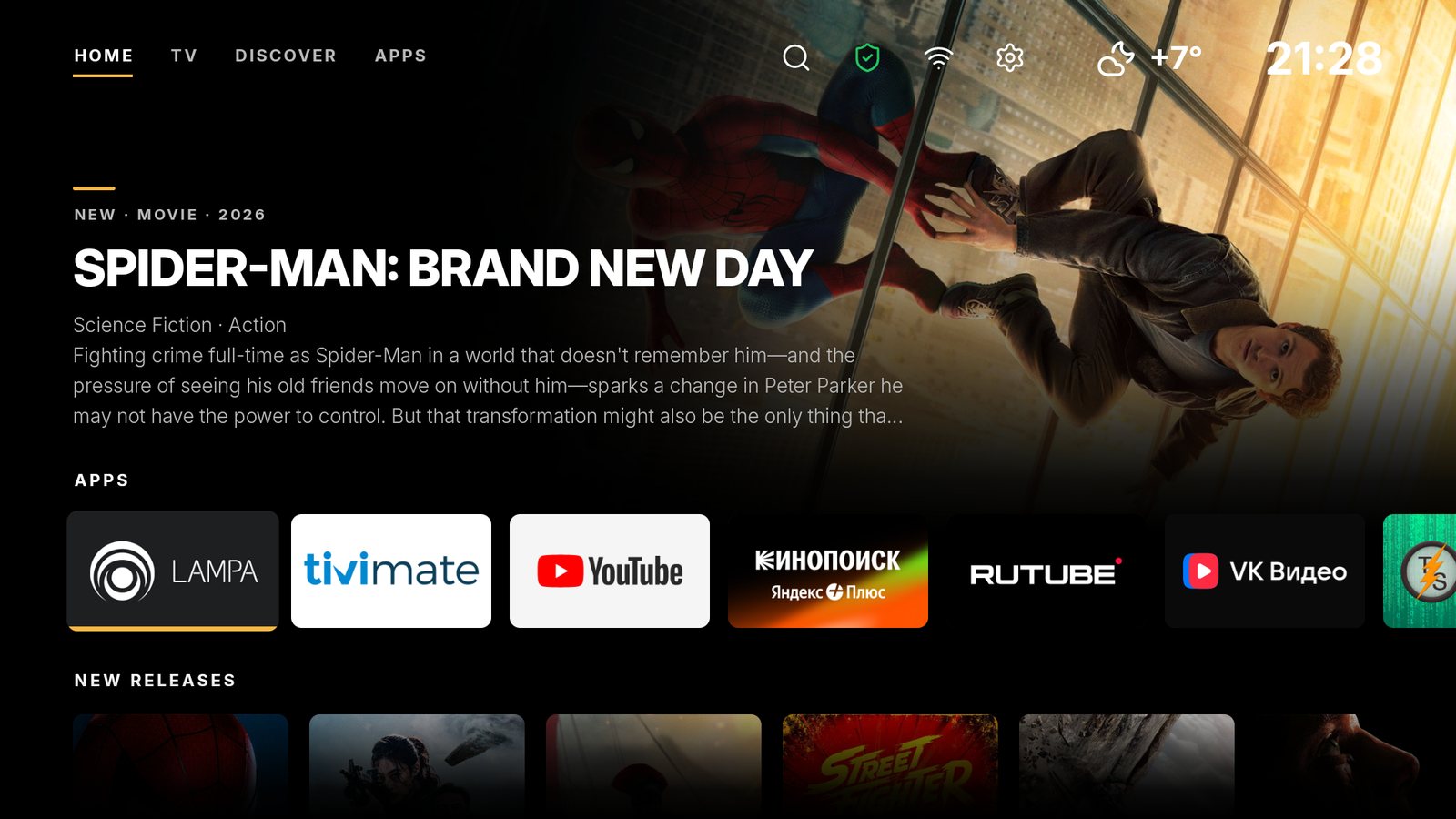
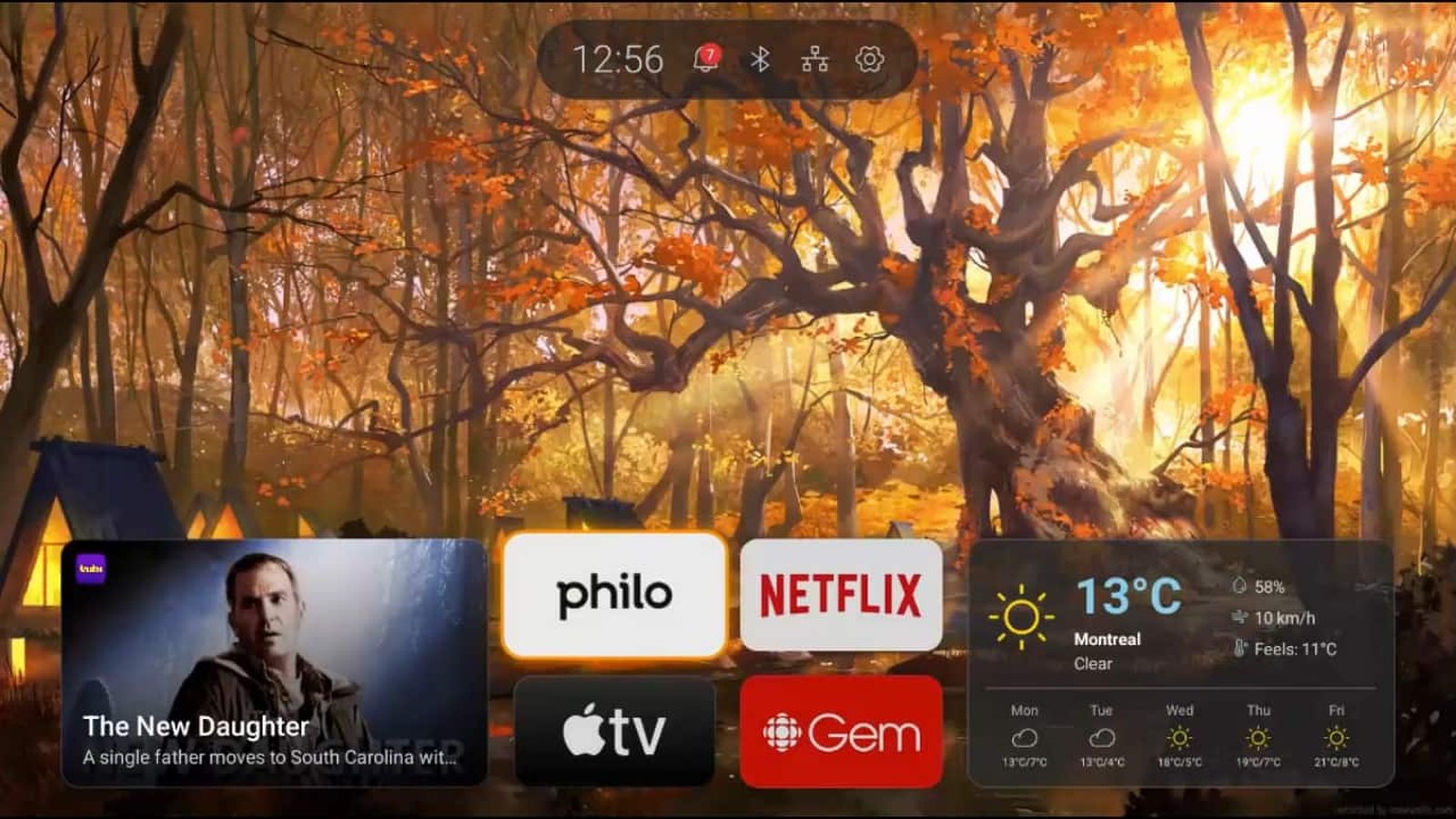
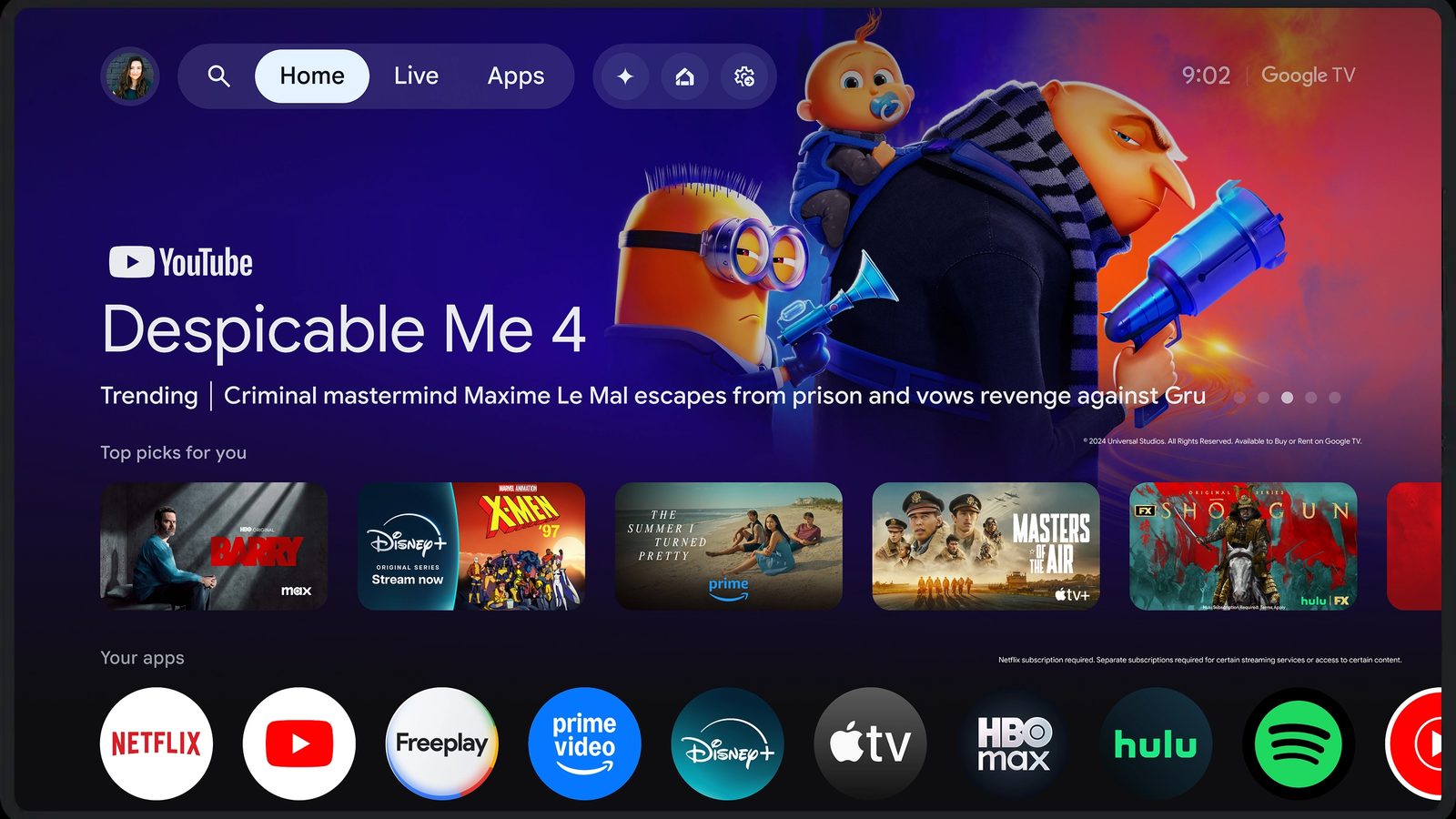
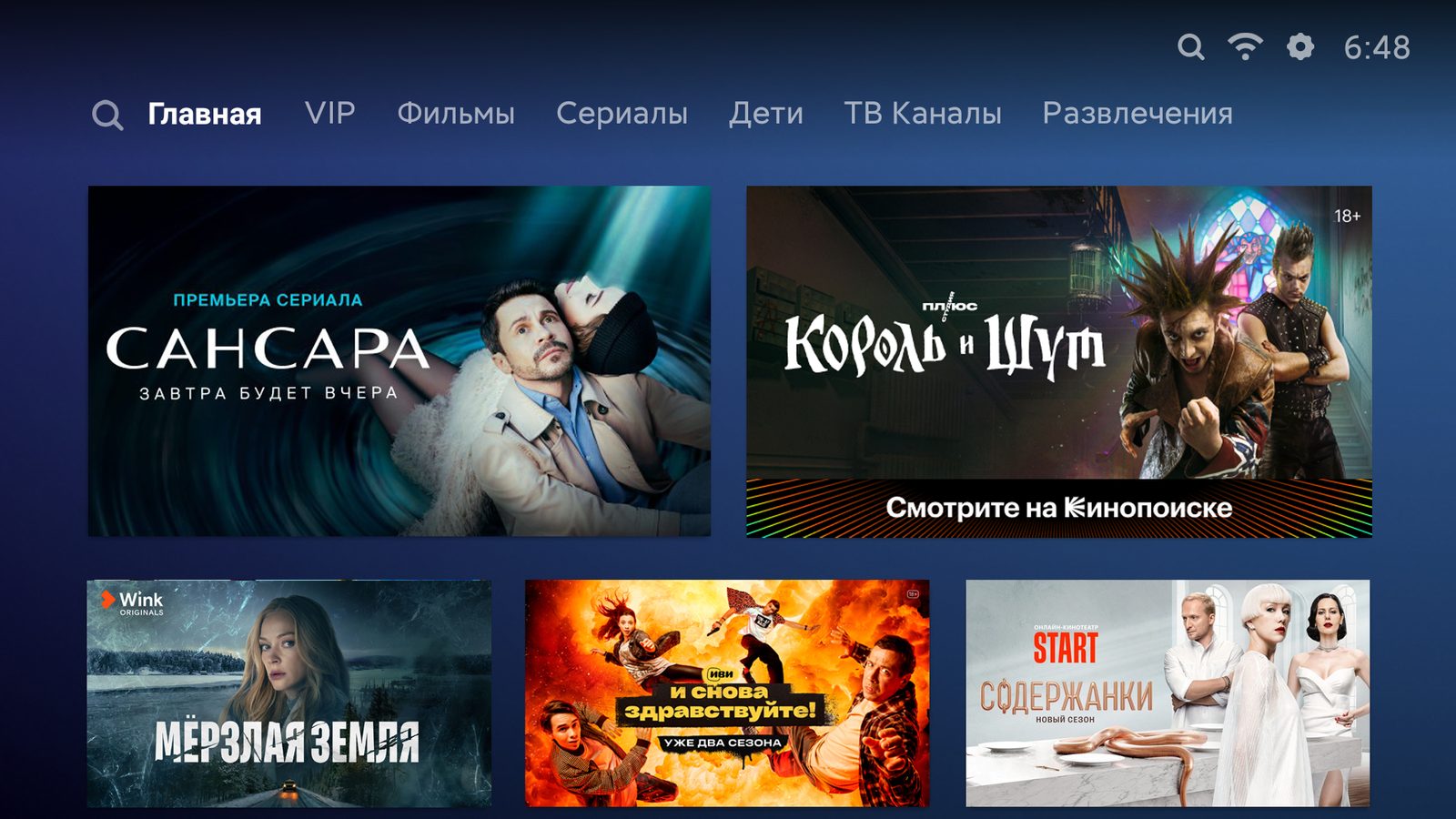
What the home screens look like
The SolaTV screenshot was taken on a Xiaomi box with Google TV 14; competitor screenshots come from developer and manufacturer pages.

How the scores are calculated
The ten criteria weigh the same, each is rated from 0 to 10 points, and the sum gives a score out of 100. A score follows the rule in the table below, not an overall impression, so any score can be checked.
| Criterion | What is rated | Points |
|---|---|---|
| Lightness | Install file size | 10: up to 10 MB; 8: up to 20 MB; 6: up to 40 MB; 4: up to 80 MB; 2: larger; 5: size not published |
| No ads | Ads and promoted rows on the home screen | 10: no ads; 6: can be turned off in settings; 3: removed partly or for money; 0: cannot be turned off |
| Privacy | Data collection and analytics | 10: no analytics and no identifiers; 7: usage and crash data, opt-out; 5: service data with a device ID, no opt-out; 3: collection for recommendations; 1: collection for advertising |
| Price | What is free and what is paid | 10: everything free; 8: free with paid extras; 5: core features paid; 3: paid only, one-time purchase; 1: subscription |
| IPTV | TV from your own playlist | 10: M3U playlist, TV guide and catch-up; 7: M3U without guide or catch-up; 4: service channels without your own playlist; 2: only rows and app launching; 0: nothing |
| Search | Movies, channels, apps and voice | 10: search across movies and services or your own channels and programs, by voice and text; 7: app search with voice; 4: no own search, the system one works from the remote button; 0: no search |
| Customization | App order, rows, wallpapers, colors | 10: rows, wallpapers, widgets or icon packs; 7: order, hiding, color and tile size; 4: app order and a simplified mode; 2: no appearance settings found |
| Collections | Movies and series on the home screen | 10: personal recommendations from services; 7: own collections with posters; 4: rows from installed apps; 0: none |
| Devices | Which TVs and boxes it installs on | 10: Android 6.0 and newer, any brand; 8: Android 8.0 and newer, any brand; 5: Google TV devices only; 2: one manufacturer only |
| Home screen | How it becomes the default and how to restore the stock one | 10: sets itself on Android TV and Google TV with one-button undo, or stock out of the box; 7: via the system dialog or its own service, no undo; 4: needs a computer or a separate app |
Competitor data comes from Google Play (US and Russia regions), developer sites, Google Help and the Xiaomi site as of October 26, 2026. Where sources disagree, the score follows the fuller description. For example, the ATV Launcher site promises no data collection, while its Google Play listing declares crash logs and location for the same version. Corrections to the scores are welcome at go@solatv.ru.
Detailed comparisons
SolaTV or Projectivy Launcher
Both free and ad-free: TV from your playlist versus video wallpapers and icon packs.
SolaTV or ATV Launcher
A free launcher with IPTV versus a paid one with widgets and folders.
SolaTV or Google TV
An ad-free home screen versus Google recommendations that cannot be turned off.
SolaTV or Xiaomi PatchWall
Your apps and channels versus streaming service banners on Xiaomi TVs.
Frequently asked questions
What is the best launcher for Android TV?
On the sum of ten criteria SolaTV comes first with 92 points out of 100. For those who care most about home screen styling, Projectivy Launcher is stronger: 10 points for customization against 7 for SolaTV.
What is the lightest launcher for Android TV?
SolaTV: a 3.9 MB install file with no animations or heavy effects. The Projectivy Launcher APK weighs 10.9–13.2 MB, Google TV 23 MB and PatchWall 23.8 MB.
Is there an ad-free launcher for Android TV?
Yes: SolaTV, Projectivy Launcher and ATV Launcher show no ads. Google TV and Xiaomi PatchWall carry the “Contains ads” label in Google Play, and Google Help states plainly that ads on Google TV cannot be turned off.
Is there a launcher with built-in IPTV?
Of the five launchers compared, only SolaTV has IPTV from your own M3U playlist with a TV guide and catch-up. The others need a separate player app.
Can ads be removed on Google TV?
Not with stock settings. Apps-only mode removes recommendations, but sponsored content and teasers stay, and search and the Assistant stop working in this mode. Ads leave the home screen once the launcher is replaced, for example with SolaTV.