- Home
- Launcher comparison
- SolaTV or PatchWall
SolaTV or Xiaomi PatchWall: a comparison for Xiaomi TVs
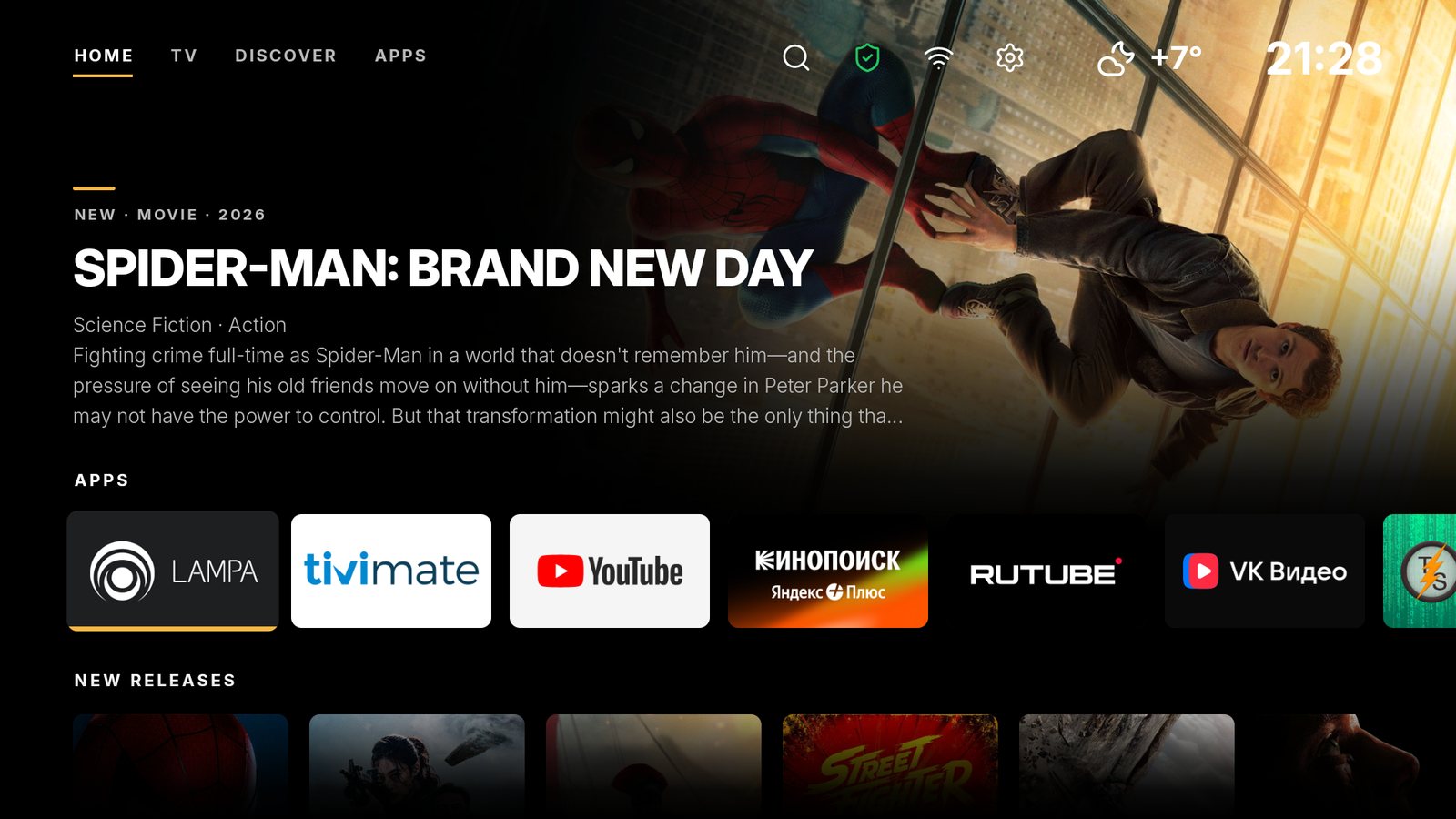
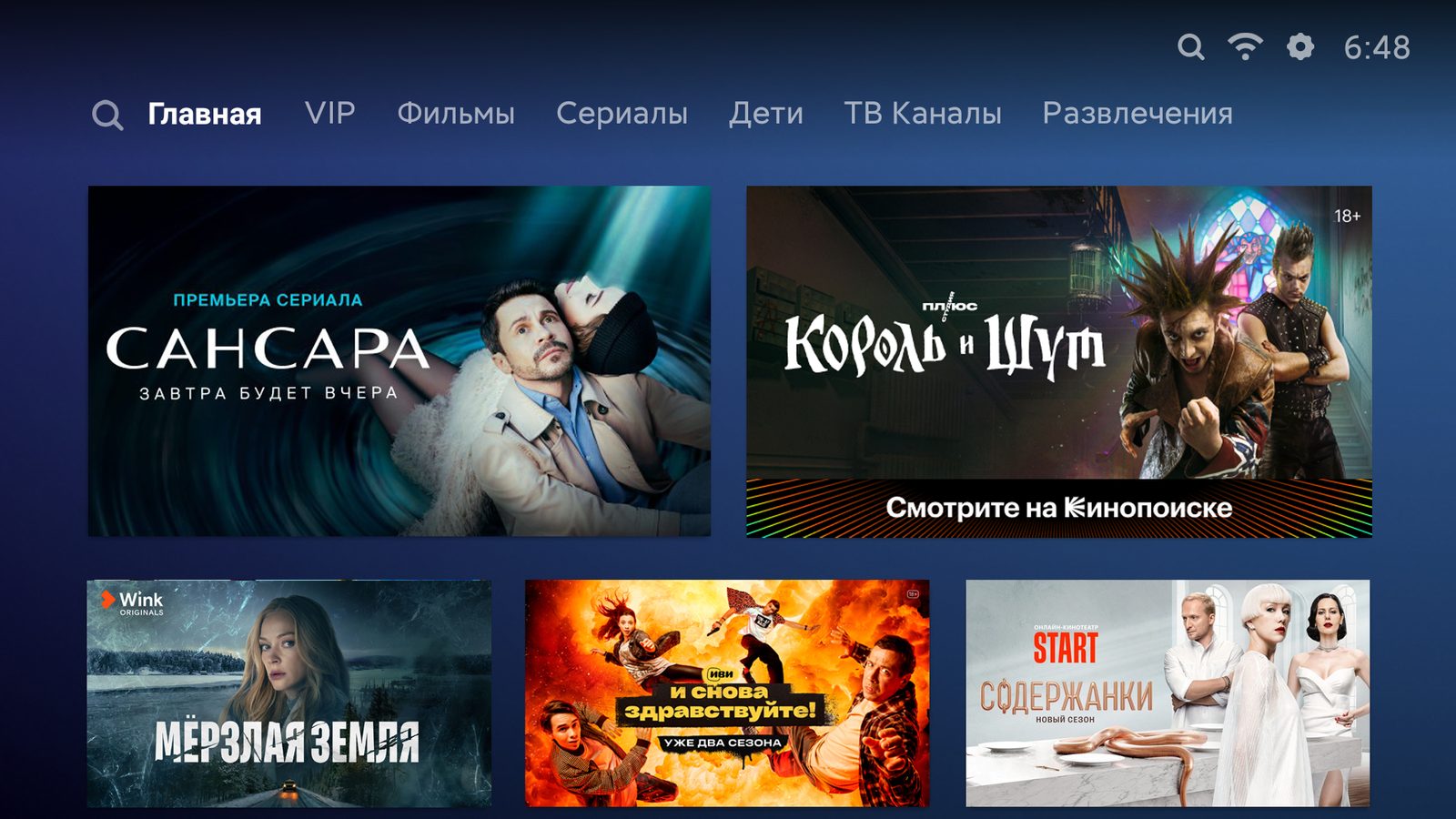
PatchWall runs on Xiaomi TVs with Android TV, and Xiaomi itself calls it a recommendation system: the home screen gathers streaming service picks based on watch history. PatchWall carries the “Contains ads” label in Google Play, and on the official Russian screenshot the home screen is filled with promo banners of Kinopoisk, Wink, Ivi and START. SolaTV replaces this screen with your apps, ad-free movie collections and IPTV from your playlist. On ten criteria SolaTV scores 92 out of 100 and PatchWall 57.
SolaTV
A light, free launcher with built-in IPTV: playlist, TV guide, catch-up. No ads, no analytics.
Download →Xiaomi PatchWall
The Xiaomi TV interface: streaming service recommendations and promo banners, on Xiaomi hardware only.
What PatchWall shows on the home screen
The Russian PatchWall opens with tabs for Home, VIP, Movies, Series, Kids, TV Channels and Entertainment. Large banners of movies and series from streaming services take almost the whole first screen, with calls like “Watch on Kinopoisk”, and installed apps move further down. Xiaomi shows its free channels in a separate app, Xiaomi TV+.
New Xiaomi TVs are moving to Google TV: mi.com/ru lists Google TV as the operating system of the Xiaomi TV A Pro 55 2025. For such models see the SolaTV and Google TV comparison.
What data PatchWall collects
The sources disagree. Google Play says PatchWall collects no data. The Mi TV privacy policy linked from the same listing names Mi Account data, the device serial number and MAC address, the Android version, app install and update details, network request and crash logs, and statistics. The data is stored in a data center in Singapore.
SolaTV contains no analytics and only contacts TMDB, Open-Meteo, your playlist and solatv.ru.
| Criterion | SolaTV | Xiaomi PatchWall |
|---|---|---|
| LightnessInstall file size | 10APK 3.9 MB, no animations | 6APK 23.8 MB |
| No adsAds and promoted rows on the home screen | 10No ads | 0“Contains ads” label, promo banners |
| PrivacyData collection and analytics | 10No analytics, no advertising IDs | 3Serial number, MAC, logs, statistics |
| PriceWhat is free and what is paid | 10Free, no paid features | 10Free, built into Xiaomi TVs |
| IPTVTV from your own playlist | 10M3U, groups, XMLTV guide, 7-day catch-up | 4Service TV channels tab, no M3U |
| SearchMovies, channels, apps and voice | 10Movies, channels and programs, voice input | 10Search across services, voice from the remote |
| CustomizationApp order, rows, wallpapers, colors | 7Order, hiding, 5 colors, tile size | 2No appearance settings found |
| CollectionsMovies and series on the home screen | 7TMDB collections with posters, not personalized | 10Recommendations based on watch history |
| DevicesWhich TVs and boxes it installs on | 8Android 8.0 and newer, any brand | 2Xiaomi TVs only |
| Home screenHow it becomes the default and how to restore the stock one | 10Sets itself on Android TV and Google TV, one-button undo | 10Stock: home screen out of the box |
| Totalout of 100 points | 92 | 57 |
The 35-point gap comes from ads, privacy, IPTV, devices and customization. PatchWall gets the maximum for recommendations and search across services.
Where PatchWall is stronger
- Streaming service picks. Ivi, Okko, Kinopoisk, Wink, START and other services are gathered in one feed with recommendations based on watch history.
- Universal search. A query searches several apps and services at once, by voice from the bundled remote or by text.
- Nothing to install. PatchWall is built into the Xiaomi TV firmware and works from the first power-on.
Where SolaTV is stronger
| Feature | SolaTV | PatchWall |
|---|---|---|
| Ads | None | “Contains ads” label, promo banners on the home screen |
| Your apps | On the home screen with native banners, in your order | Below the service picks |
| TV from a playlist | M3U, XMLTV guide, 7-day catch-up | Service TV Channels tab, you cannot add your own M3U |
| Devices | Any Android TV and Google TV with Android 8.0 | Xiaomi TVs only |
| Size | 3.9 MB | 23.8 MB |
On the Xiaomi TV with Android TV where SolaTV has been tested since its first versions, it works as the default launcher from version 1.6. 4PDA users also run SolaTV on the Xiaomi TV A55 with Android 14.
SolaTV and PatchWall home screens
How to replace PatchWall on a Xiaomi TV
Some Xiaomi TVs have two home screens: PatchWall opens at power-on, and the Home button leads to Android TV Home. A Habr article of June 7, 2026 describes this on a Mi TV with Android 11, with both screens kept in memory.
- Install SolaTV following the guide “How to install apps on Android TV”.
- Turn off PatchWall as the power-on screen if the option exists: on most Mi TVs it is Settings → Additional Settings → Device Preferences → PatchWall, switch “Set PatchWall as default launcher”.
- In SolaTV settings press “Default launcher” → “Make default”: on Android TV SolaTV disables Google’s stock launcher itself and remembers what to restore.
PatchWall itself is disabled from a computer with adb shell pm disable-user --user 0 com.mitv.tvhome.atv and re-enabled with pm enable and the same package name. On the TV where SolaTV is tested, PatchWall is disabled exactly this way.
Frequently asked questions
What is PatchWall?
PatchWall is the interface of Xiaomi TVs with Android TV, the home screen that opens at power-on. Xiaomi calls it a recommendation system: PatchWall gathers movies and series from streaming services into picks based on watch history. In Russia it shows picks from Kinopoisk, Ivi, Okko, Wink and other services.
How do I remove ads on a Xiaomi TV?
Xiaomi publishes no official way to turn off ads in PatchWall. Ads leave the home screen when an ad-free launcher such as SolaTV becomes the default, and PatchWall is disabled or stops opening at power-on.
Can I bring PatchWall back?
Yes. “Restore” in SolaTV re-enables everything SolaTV disabled, and a PatchWall disabled by hand comes back with adb shell pm enable com.mitv.tvhome.atv.
Does SolaTV work on new Xiaomi TVs with Google TV?
Yes. SolaTV is tested on a Xiaomi box and a Xiaomi TV Stick 4K with Google TV 14 and becomes the default through its own service, without disabling Google’s launcher.
Will streaming apps stay after replacing PatchWall?
Yes. The Kinopoisk, Ivi, Okko and other apps stay installed and open from the SolaTV home screen; they can be placed in the first row.